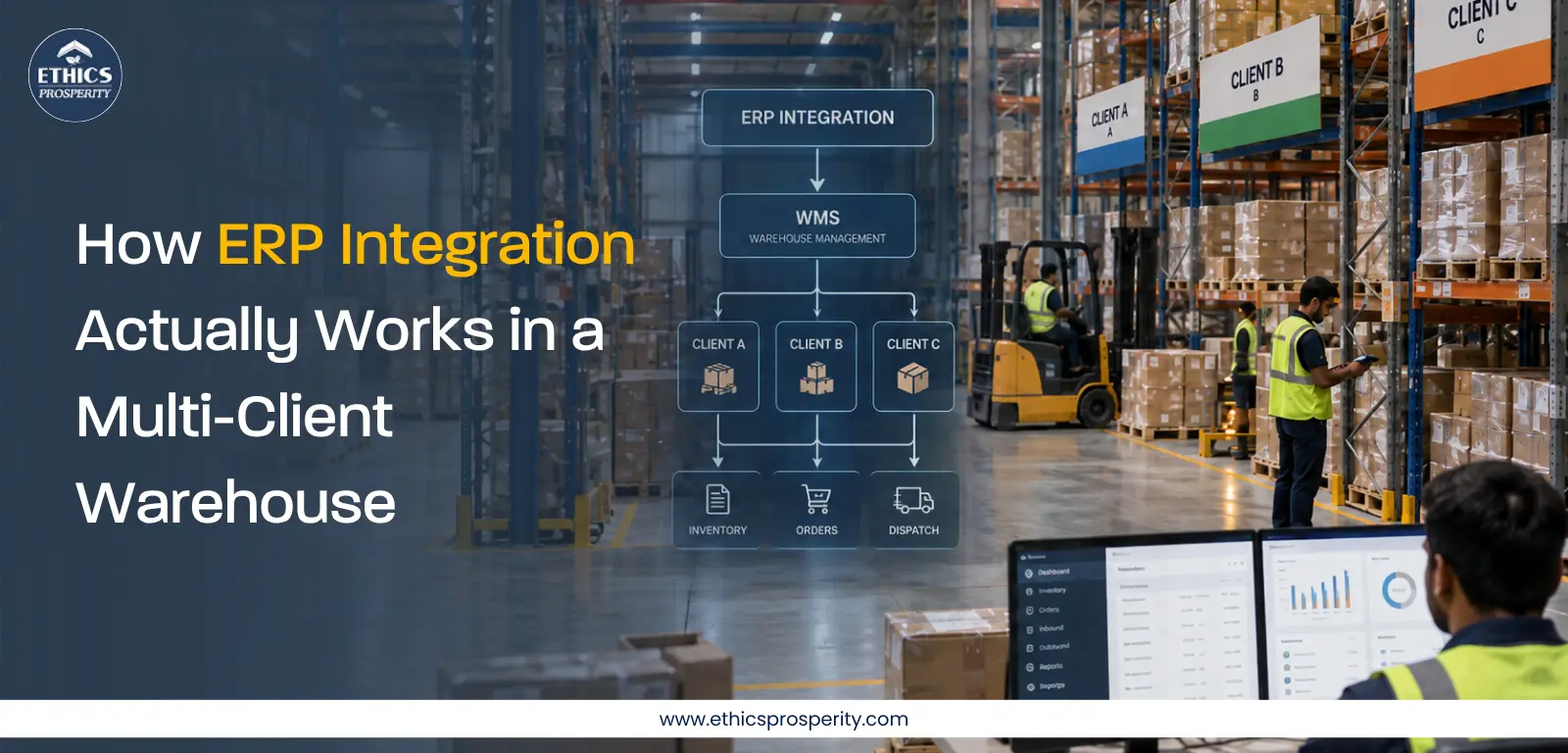
A multi-client warehouse is fundamentally different from a dedicated warehouse.
One facility may handle products belonging to several businesses, each with different SKUs, order rules, packaging requirements, inventory ownership structures, billing logic, service-level agreements and reporting expectations.
In that environment, an ERP cannot simply exchange basic order data with a warehouse platform and be considered “integrated.”
The real objective is to create a controlled flow of information between commercial systems and physical warehouse operations. Orders created in an ERP must become executable warehouse tasks, while inventory movements, dispatches, exceptions and confirmations must reliably move back into the business system.
This is where ERP Integration in Multi-Client Warehouse operations becomes strategically important.
For 3PL operators and businesses managing multiple clients, the integration has to deliver three things simultaneously: data accuracy, operational control and client-level visibility.
What Is ERP Integration in a Multi-Client Warehouse?
ERP integration connects the enterprise system used to manage business transactions with the warehouse technology responsible for executing physical operations.
The ERP typically handles areas such as purchasing, sales orders, finance, customer information and commercial transactions. The warehouse platform manages activities such as receiving, put-away, picking, packing, stock movements and dispatch.
The integration creates a digital connection between these two layers.
For example, when a customer order is confirmed in an ERP, relevant order information can move to the warehouse platform. The warehouse then checks available stock, allocates inventory, creates picking activity and eventually sends fulfillment status back to the ERP.
In a multi-client environment, the complexity increases because the same warehouse infrastructure may serve several businesses simultaneously.
Each client may require separate inventory ownership, SKU mapping, order priorities, reporting formats, billing rules and service levels.
Therefore, the integration architecture must support client-level segregation while maintaining centralized operational control.
This is particularly important for businesses that depend on integrated Supply chain management, where commercial decisions and warehouse execution need to remain synchronized.
How ERP and WMS Integration Works
The integration is best understood as a continuous data cycle rather than a one-time connection.
1. Master Data Synchronization
Before orders can move correctly, the systems need to agree on the basic data.
This can include:
-
SKU and product codes
-
Customer information
-
Warehouse and location codes
-
Units of measure
-
Packaging configurations
-
Tax or commercial attributes
-
Batch and expiry information where applicable
-
Client-specific rules
Poor master data is one of the most common causes of integration problems.
A product may exist under one code in the ERP and another in the warehouse platform. Similarly, one system may treat a case as a unit while another interprets it differently.
These differences can create inventory mismatches and incorrect fulfillment.
2. Order and Inventory Data Exchange
Once master data is aligned, transactional information can move between systems.
An ERP may send:
-
Sales orders
-
Purchase orders
-
Transfer orders
-
Customer details
-
Delivery requirements
-
Cancellation requests
The warehouse platform can return:
-
Order acceptance
-
Allocation status
-
Pick confirmation
-
Packed quantity
-
Dispatch confirmation
-
Shortage or exception information
-
Inventory adjustments
The objective is not simply to move data quickly. The objective is to ensure that the right client, order, SKU and quantity remain associated throughout the transaction.
3. Warehouse Execution
After receiving an order, the warehouse system converts business instructions into physical activities.
Depending on the operating model, this can involve allocation, wave planning, picking, packing, staging and dispatch.
For a multi-client operation, rules can differ by account.
One client may require FEFO for expiry-sensitive products. Another may use FIFO. A third may require serial-number capture or customer-specific packaging.
The integration therefore needs to support operational rules without compromising inventory segregation.
This is where the Warehouse Management System becomes the execution layer between digital orders and physical warehouse activity.
4. Shipment and Status Updates
Once an order leaves the warehouse, its status needs to return to the appropriate business system.
Typical updates may include:
-
Picked
-
Packed
-
Ready for dispatch
-
Dispatched
-
Partially fulfilled
-
Cancelled
-
Exception
-
Returned
Timely status updates improve customer communication and reduce the need for manual follow-ups between warehouse teams, customer-service teams and client representatives.
5. Reconciliation and Exception Handling
Successful integration is not measured only by transactions that work correctly.
The real operational test is how the system handles transactions that do not.
Examples include:
-
Duplicate orders
-
Incorrect SKU codes
-
Partial quantities
-
Stock shortages
-
Cancelled orders
-
API failures
-
Duplicate messages
-
Delayed status updates
-
Inventory discrepancies
A mature integration process should have validation rules, error queues, alerts, retry mechanisms and clear ownership for unresolved exceptions.
Without exception management, even a technically connected system can create operational bottlenecks.
Challenges in Multi-Client Warehouse Integration
Client-Specific Processes and Data
Every client may have different commercial and operational requirements.
Trying to force every account into exactly the same process can create unnecessary workarounds.
The better approach is to establish a standardized integration framework with controlled configuration for client-specific rules.
Inventory Ownership and Visibility
In shared warehouses, inventory is not simply “warehouse stock.”
Stock may belong to different legal entities or customers and may have different restrictions.
The integration must therefore preserve ownership, location, quantity and status at the required level of detail.
This becomes critical for inventory management, reconciliation and client reporting.
Integration Reliability
An integration that works during normal transaction volumes may fail under peak loads.
End-of-month processing, promotional campaigns, festive demand and marketplace events can create sudden transaction spikes.
Integration architecture should therefore be tested for volume, latency, retries and failure recovery before being considered operationally ready.
Data Quality and Master Data Governance
Technology cannot compensate for poor data discipline.
If product dimensions, units, SKU codes or customer information are inconsistent, automation can simply make incorrect information move faster.
A strong governance process should define who owns master data, how changes are approved and how synchronization failures are handled.
Exception Management
Warehouse operations inevitably produce exceptions.
The important question is whether teams can identify and resolve them quickly.
A useful integration should provide visibility into failed transactions rather than silently dropping them into a technical queue that warehouse teams cannot access.
ERP Integration Methods
There is no single integration method that fits every warehouse.
API-Based Integration
APIs allow systems to exchange information programmatically and are well suited to environments requiring near-real-time updates.
They are particularly useful when order status, inventory availability or shipment information needs to move quickly between systems.
EDI Integration
Electronic Data Interchange remains relevant where trading partners already use standardized business documents.
EDI can support structured exchanges such as purchase orders, order acknowledgements, shipment notices and invoices.
Middleware-Based Integration
Middleware can act as an orchestration layer between multiple ERPs, warehouse platforms and external systems.
This is valuable in complex multi-client operations where each client may use a different ERP or data structure.
File-Based Integration
CSV, XML or other scheduled file exchanges can still be practical for lower-frequency processes or legacy environments.
However, file-based integration requires strong controls around file naming, timing, versioning, validation and duplicate processing.
The right choice depends on transaction volume, latency requirements, system capabilities, security requirements and the complexity of the operating model.
Benefits of ERP-WMS Integration
Better Inventory and Order Visibility
When business and warehouse systems remain synchronized, decision-makers have a clearer view of what has been ordered, allocated, picked, dispatched and delivered.
This supports an End-to-end supply chain view rather than creating separate information silos.
Faster Warehouse Execution
Automated order transfer reduces manual data entry.
That can shorten the time between order confirmation and warehouse release while reducing avoidable errors.
Improved Accuracy and Control
Integration creates traceability across transactions.
For example, an inventory adjustment can be connected to a warehouse movement instead of being entered manually without operational context.
This strengthens auditability and reduces reconciliation effort.
Better Scalability Across Clients
A well-designed integration framework allows new accounts to be onboarded without rebuilding the entire technology architecture.
This is particularly important for supply chain companies operating multiple facilities or supporting clients with different technology environments.
The objective is not merely to add more integrations. It is to create a repeatable onboarding model.
Best Practices for Successful ERP-WMS Integration
Successful integration begins with process design, not software configuration.
Before implementation, map the complete order-to-dispatch workflow and identify where data originates, where it changes and where accountability sits.
Key practices include:
-
Define system ownership clearly — establish which system is the source of truth for each data element.
-
Standardize master data — create controlled rules for SKUs, units, locations, customers and inventory attributes.
-
Design for exceptions — define what happens when transactions fail, stock is unavailable or information is inconsistent.
-
Use client-specific configuration carefully — accommodate genuine business requirements without creating unnecessary customization.
-
Test peak scenarios — test high transaction volumes, partial orders, cancellations and integration failures.
-
Create monitoring dashboards — operational teams should be able to see integration failures without depending entirely on IT teams.
-
Measure business outcomes — evaluate whether integration is actually improving accuracy, cycle time and service performance.
For organizations investing in smart warehousing, integration should be treated as the foundation connecting technology investments with day-to-day warehouse execution.
KPIs to Measure ERP-WMS Integration Performance
A technically successful integration does not necessarily mean a commercially successful one.
Decision-makers should track KPIs such as:
-
Order transmission success rate
-
Integration error rate
-
Inventory synchronization accuracy
-
Order processing cycle time
-
Order accuracy
-
Inventory adjustment frequency
-
Status-update latency
-
Pick-to-dispatch cycle time
-
Exception resolution time
-
System availability
-
Client onboarding time
These metrics help identify whether the integration is creating measurable operational value.
For example, if order transmission is technically successful but warehouse teams continue to perform manual reconciliation, the integration may need process redesign rather than another software upgrade.
Likewise, investments in warehousing automation should be evaluated against measurable improvements in throughput, accuracy, labor productivity and service levels.
Conclusion
ERP integration in a multi-client warehouse is ultimately about connecting commercial decisions with physical execution.
The technology must allow orders, inventory, warehouse activity and shipment information to move reliably across systems while preserving client-specific rules and operational controls.
For organizations evaluating warehousing solutions, the right question is therefore not simply, “Can our ERP connect to the warehouse?”
The better question is: Can our systems provide accurate, timely and actionable information across every stage of the warehouse process?
That distinction becomes increasingly important as B2B Warehousing operations become more technology-driven and customer expectations around visibility continue to increase.
Modern warehousing and logistics operations are also becoming more connected, with Order management system platforms, automation, analytics and emerging AI and IoT in Warehousing capabilities increasingly interacting with core enterprise and warehouse systems.
For warehouse companies in India, scalability and integration readiness will become increasingly important as businesses operate across multiple channels, locations and customer segments. The same consideration applies to warehouse companies in bangalore and other major logistics markets where technology-enabled fulfillment is becoming a competitive requirement.
A well-designed integration is therefore not simply an IT project. It is an operational capability that can strengthen accuracy, visibility, scalability and service performance. For businesses building connected supply chain operations, Ethics Prosperity can be considered as part of the broader conversation around technology-enabled warehousing and fulfillment.